I've just upgraded my Microsoft Office 2010 to
2013 version, although the installations completed relatively fast and hassled free (my Outlook 2010 settings still remains the same) and activation was a breeze.
The only drawback was my Outlook 2013 loading is very slow, not sure what is the problems until I've google it and found Microsoft's recommendations (though from a forum), it seems that not only I'm experiencing the slow loading problems, other users around the world also have similar problems.
A workaround was publish/recommended by Microsoft and the steps as below :-
Note : This workaround involved in editing the registry settings, there are similar safer way but you need to wait for the loading to complete before configuring it.
1. Run -->
regedit.
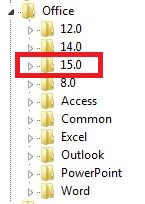
2. Browse -->
HKCU\Software\Microsoft\Office\15.0\Common
 |
| --> HKCU\Software |
 |
| --> HKCU\Software\Microsoft |
 |
--> HKCU\Software\Microsoft\Office
|
 |
| --> HKCU\Software\Microsoft\Office\15.0 |
 |
| --> HKCU\Software\Microsoft\Office\15.0\Common |
3. Create a new "
Key" named "
Graphics".
 |
| Create New Folder --> Graphics |
4. In "
Graphics" folder, create a new "
DWORD" key named "
DisableHardwareAcceleration" key.
 |
| Create new Key --> DisableHardwareAcceleration |
5. Modify the key to value "
1" in "
Hexadecimal" option.
 |
| Modify Value = 1 (Hexadecimal) |
6.
Restart your computer for the effects, your Outlook 2013 should be loading at a much more faster rate.
HAPPY COMPUTING !!!